📌 Key Takeaways
- “Best” is not a universal ranking here: the useful question is which game fits a child’s interests, reading level, patience, motor comfort, and preferred kind of challenge.
- MIA Games currently offers 13 browser games spanning logic, memory, words, strategy, reflex, arcade, numbers, and falling-block play.
- Each game creates specific opportunities to practise actions such as recalling locations, scanning patterns, planning moves, following constraints, or reacting to signals. Those mechanics are not proof of broad academic or developmental gains.
- A thoughtful choice also considers ease of starting, controls, frustration level, replay value, advertising, privacy, and whether play fits the child’s wider routine.
- There is no single screen-time number or universal “best game” for every child. Current pediatric guidance places greater emphasis on quality, context, healthy routines, and family needs.
Finding a free browser game for a child is easy. Finding one that is genuinely worth returning to requires a little more thought.
A search for best free browser games for kids can produce long lists filled with familiar titles, but a list alone does not answer the questions parents actually face: Is the game understandable? Is the challenge appropriate? What does the child have to do from one moment to the next? Can the child play without unnecessary complexity? And does the game fit comfortably into family life?
This guide approaches those questions from the mechanics outward. Rather than attaching a vague “educational” label to a game because it contains letters, numbers, or puzzles, we describe the actual activity: remembering, scanning, comparing, planning, timing, deduction, or responding. That gives parents a more useful basis for choosing.
MIA Games is a collection of 13 classic browser games built around straightforward, low-friction play. The collection includes puzzle, word, memory, strategy, arcade, reflex, number, and falling-block formats. The games are designed to open directly in a modern browser, without requiring a separate download or a MIA Games player account. Explore MIA Games
🧠 A useful distinction: A game can exercise a particular type of thinking without being proven to produce a broad educational, medical, or developmental outcome. This article evaluates observable game mechanics and practical fit; it does not promise higher grades, greater intelligence, treatment of a condition, or a guaranteed developmental effect.
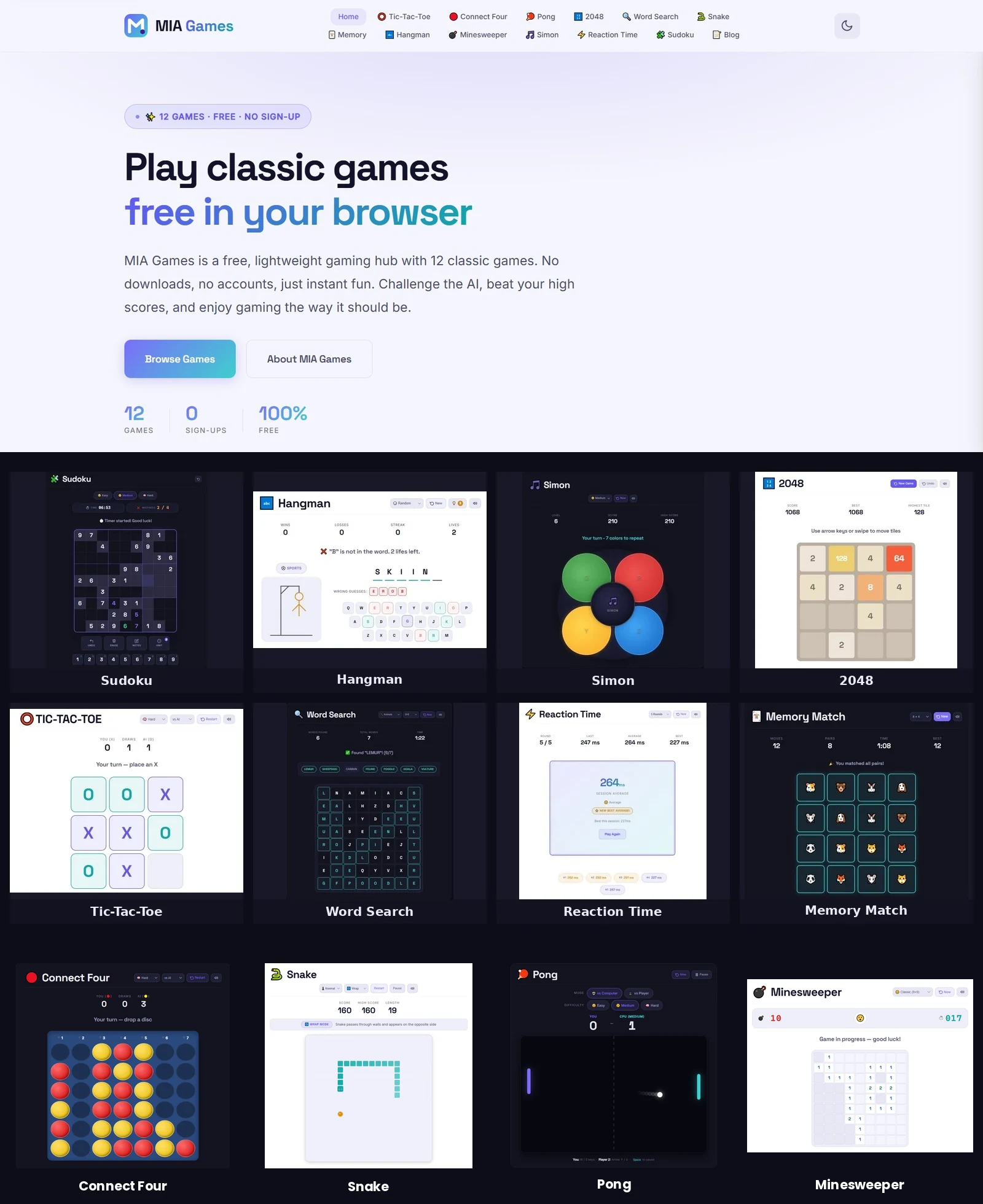
What Makes a Browser Game a Good Choice for Kids?
“Kid-friendly” is not a single game mechanic. A good choice depends on the child and the context in which the game is being used. A young child learning to follow simple rules, a child who enjoys logic puzzles, and an older child looking for a strategy challenge may all need something different.
When evaluating a browser game, look beyond the artwork and ask what the experience is actually like:
- Clear objective: The child should understand what counts as progress or success.
- Manageable rules: A small rule set can reduce unnecessary complexity and make independent play easier.
- Meaningful feedback: A move, guess, or decision should produce information the child can use on the next attempt.
- Appropriate challenge: The game should be interesting without making every session a frustration test.
- Comfortable controls: Touch, mouse, and keyboard demands matter, especially for younger players.
- Replay value: New boards, sequences, positions, or decisions make repeated play meaningfully different.
- Predictable social environment: A solo puzzle or local two-player game is fundamentally different from an open social platform with strangers.
- Healthy place in the routine: Even an enjoyable game should coexist with sleep, movement, schoolwork, reading, creative activity, and family interaction.
The American Academy of Pediatrics’ 2026 policy statement treats children’s digital experiences as part of a broader ecosystem rather than reducing the issue to a single screen-time number. It emphasizes child-centered design, quality and context, healthy activities such as sleep and physical activity, and family involvement. [1]
💡 Parent’s quick test: Try one round yourself. Can you explain the goal in one or two sentences? Are the controls predictable? Is the difficulty understandable? Is it obvious what is the game and what is advertising? A two-minute check can tell you more than a generic age label.
How We Evaluated the 13 MIA Games
This is not a scientific ranking and the order of the games is not a claim that one is universally superior. The purpose is to make the MIA Games collection easier to navigate for families who want to match a game with a particular kind of play.
Our editorial framework uses five practical questions:
- What is the core action? Does the child remember, scan, place, plan, calculate, react, or infer?
- What changes from one attempt to the next? A replay is more meaningful when the board, sequence, word, opponent, or available choices create a new problem.
- How much explanation is needed? Straightforward rules can make a game accessible, while abstract systems may suit children who enjoy deliberate problem-solving.
- What kind of attention does it demand? Some games reward sustained concentration; others reward rapid responses or continuous monitoring.
- Who might enjoy it? We describe likely player preferences rather than assigning a rigid age to every game.
This approach prevents a common mistake: treating every “brain game” as if it trains the same thing. Sudoku, Pong, Memory Match, Hangman, and Connect Four are all games, but their moment-to-moment demands are very different.
The 13 Best Free Browser Games for Kids
The 13 choices below are best understood as a menu of challenges, not a leaderboard. Each description focuses on what the player actually does and why a particular type of child might find that interaction appealing.
1. Sudoku
Core challenge: constraint-based logic. The player fills a 9×9 grid while respecting number-placement rules. It suits children who enjoy quiet, deliberate problem-solving and comparing possibilities before committing to a move.
Play Sudoku →2. Memory Match
Core challenge: visual recall. Players reveal cards, remember locations, and use previous observations to find pairs. Its simple loop makes it approachable for a calm, easy-to-explain challenge.
Play Memory Match →3. Snake
Core challenge: continuous control and spatial timing. The player guides a moving snake toward targets while avoiding collisions, so each decision affects where later movement remains possible.
Play Snake →4. Simon
Core challenge: sequence memory. The player observes and reproduces a growing pattern of signals. It suits children who enjoy repetition, rhythm, and remembering an ordered sequence.
Play Simon →5. Minesweeper
Core challenge: deduction from clues. Numbered cells provide information about nearby hazards, so the player reasons about what is known, what is possible, and which move is justified.
Play Minesweeper →6. 2048
Core challenge: number merging plus board management. Each move changes available space, so the player considers both the immediate merge and the position it leaves behind.
Play 2048 →7. Hangman
Core challenge: word inference. Each letter guess adds or removes possibilities, making spelling patterns, vocabulary, and elimination part of the same puzzle.
Play Hangman →8. Pong
Core challenge: timing and continuous visual tracking. The player moves a paddle in response to a moving ball, making it a fit for children who prefer active interaction over slower puzzles.
Play Pong →9. Word Search
Core challenge: systematic visual scanning. Players search a letter grid for hidden words, making direction, letter sequences, and sustained visual attention central to the task.
Play Word Search →10. Connect Four
Core challenge: turn-based planning. A move changes both your possibilities and the opponent’s, so children can see the connection between placement, threats, blocking, and the next turn.
Play Connect Four →11. Tic-Tac-Toe
Core challenge: simple strategic planning. The small board makes threats and consequences visible, making it a natural introduction to turn-taking, blocking, and thinking ahead.
Play Tic-Tac-Toe →12. Reaction Time
Core challenge: signal detection and response timing. It can be a fun short reflex challenge, but a result from one session is not a general measure of intelligence or development.
Play Reaction Time →13. Classic Stack
Core challenge: spatial placement under time pressure. Falling blocks must be rotated and positioned to create completed lines, requiring attention to current space and what comes next.
Play Classic Stack →Which Game Fits Which Kind of Player?
The most useful “best game” list is one that helps a parent narrow the choices. Use these categories as a starting point rather than a prescription.
- Likes calm, deliberate puzzles: Sudoku, Minesweeper, 2048, or Memory Match.
- Enjoys words and letters: Hangman or Word Search.
- Likes remembering sequences or locations: Simon or Memory Match.
- Enjoys planning against another person: Tic-Tac-Toe or Connect Four.
- Prefers rapid visual response: Reaction Time, Pong, or Snake.
- Likes spatial arrangement: Classic Stack or 2048.
- Wants a gradual introduction to logic: Tic-Tac-Toe can be a simpler starting point before more abstract systems such as Sudoku or Minesweeper.
💡 A better starting question: Instead of asking “Which game is most educational?”, ask “What kind of challenge will my child enjoy enough to engage with?” Enjoyment does not guarantee learning, but genuine engagement gives the child a reason to observe, decide, make mistakes, and try again.
What Skills Are Actually Being Practised?
It is useful to name the mechanics precisely. A game does not need a formal educational label for a child to practise a recognizable action during play. At the same time, “practises memory” is much narrower than “improves memory in everyday life.”
- Memory Match: remembering where information appeared and using that information later.
- Simon: retaining and reproducing an ordered sequence.
- Hangman and Word Search: working with letters, word patterns, visual scanning, and vocabulary-related information.
- Sudoku and Minesweeper: applying rules and constraints to narrow possibilities.
- 2048 and Classic Stack: managing space while considering consequences of a move.
- Tic-Tac-Toe and Connect Four: anticipating another player’s possible responses and protecting against immediate threats.
- Snake, Pong, and Reaction Time: visually monitoring movement and responding with timing and control.
These are descriptions of the games themselves. They are not claims that a particular game transfers automatically to school grades, general intelligence, or a clinical outcome.
Why Variety Matters More Than Finding One “Perfect” Game
A child does not need one game to cover every kind of thinking. Different games provide different experiences. A quiet logic puzzle may be appealing after a busy day, while a quick reaction game may be more enjoyable when the child wants active interaction. A two-player strategy game creates a different social experience from a solo word puzzle.
Variety also lets parents respond to the child’s actual behavior. If a game repeatedly causes frustration, another game can provide a different entry point. If a child finishes a simple puzzle quickly, a more complex format may offer a new challenge. If reading-heavy play feels tiring, a visual or timing-based game may be a better fit that day.
The goal is not maximum difficulty. A useful challenge is one the child can understand, attempt, and learn from without turning the session into a struggle.
Browser Games vs. Downloaded Games: What Changes for Families?
Browser games have a practical advantage: the path from “I want to play” to actually starting a round is short. There is normally no app-store installation step or separate launcher. On MIA Games, the games can be opened directly in a modern browser without creating a player account.
MIA Games also uses browser-based local storage for certain preferences, scores, or best times where the individual game supports it. That is different from requiring a player profile. Families should still review the site’s privacy information and browser settings because “no account” does not mean that a website has no technology, advertising, analytics, or privacy considerations.
- Low setup: Open the page in a modern browser and start the game.
- No MIA Games account required: A player can start without creating a profile.
- Short-session friendly: Classic rounds can usually be started and stopped without committing to a long campaign.
- One collection, many challenge types: Families can move between puzzle, word, memory, strategy, and arcade formats without changing platforms.
- Local browser progress where supported: Some game preferences or scores can remain on the device through browser storage rather than a player account.
Screen Time: Look at the Whole Routine, Not Just the Timer
“How many minutes?” is a reasonable parent question, but it is not the only one. The quality of the activity, the child’s needs, the time of day, what the game displaces, and how the child is responding all matter.
The AAP’s current policy statement emphasizes the broader digital ecosystem and recommends child-centered, high-quality experiences while protecting healthy activities such as sleep, physical activity, reading, and family life. It also notes that much digital-media research is observational, so associations should not automatically be interpreted as proof of causation. [1]
For practical family use, ask:
- Is the child sleeping well and getting enough movement?
- Is game time crowding out homework, reading, meals, outdoor play, or family interaction?
- Does the child stop comfortably when the agreed session ends?
- Is the content appropriate for the child’s developmental stage?
- Does the game create useful engagement, or is the child simply being pulled from one round into the next?
Online Safety and Privacy: A Parent Checklist
Even a simple browser game deserves the same basic online-safety habits used elsewhere on the web. The ESRB advises parents to review privacy statements and understand what information an internet-connected game or service may collect, use, and share. [2]
🔒 Before a child plays: Teach children not to share their full name, address, school details, passwords, or other sensitive information with strangers. Explain that an advertisement is separate from the game and that unfamiliar offers should not be clicked without an adult’s help. Review privacy settings where appropriate, and distinguish a simple solo game from services involving chat, public profiles, strangers, or user-generated content.
MIA Games is centered on classic browser games rather than open-ended social gaming, but parents should still make their own suitability judgment for the device, browser, child, and surrounding online environment.
How Parents Can Turn Play Into a Useful Conversation
There is no need to turn recreational play into homework. A better approach is to occasionally ask the child to explain a decision. The question can be short enough that it does not interrupt the fun.
- Memory Match: “Which cards do you remember seeing already?”
- Simon: “How are you remembering the order?”
- 2048: “What space will this move leave you?”
- Connect Four: “What could the other player do next?”
- Hangman: “Which letters have you ruled out?”
- Sudoku: “What makes that number possible in this row or column?”
- Classic Stack: “Where could this piece go without making the next move harder?”
The value of these conversations is not that they magically transform a game into a lesson. They simply encourage children to describe reasoning, tolerate mistakes, notice patterns, and consider alternatives while keeping the activity recognizably playful.
Common Mistakes When Choosing Games for Children
A polished game list can still mislead if it encourages parents to make decisions from labels alone.
- Assuming “educational” means proven effective: A game can contain numbers, words, or puzzles without evidence that it improves school performance.
- Choosing by age alone: Children of the same age can differ in reading ability, patience, motor comfort, interests, and prior game experience.
- Confusing a narrow score with a broad ability: A reaction-time result is a measurement from a particular task, not a complete assessment of intelligence or development.
- Making difficulty the goal: Harder is not automatically better. A challenge is useful when the child can understand what to try next.
- Ignoring frustration: If a child repeatedly becomes upset, switching games or stopping is often more sensible than pushing through.
- Forgetting the wider routine: Even excellent game design cannot replace sleep, movement, reading, school responsibilities, creative activity, and relationships.
- Treating every online game as the same: A simple puzzle page and an open social game have very different privacy and safety considerations.
Frequently Asked Questions
Are these browser games really free?
MIA Games presents its collection as free to play. Advertising may appear in designated areas of the website to support the service, but the games do not require a paid subscription or purchase to start playing.
Are these games actually educational?
They can provide opportunities to practise specific actions such as remembering locations, scanning letters, following constraints, planning moves, or responding to signals. That is a description of gameplay, not a guarantee of improved grades, intelligence, or academic performance.
What age are these games suitable for?
There is no single age range that fits all 13 games. Simpler formats such as Memory Match and Tic-Tac-Toe can be easier to introduce, while Sudoku and Minesweeper may demand more patience and abstract reasoning. Parents should judge suitability by the individual child’s development, interests, reading ability, and comfort with the controls.
Can children play the games on a phone or tablet?
MIA Games is designed for modern desktop, tablet, and smartphone browsers. The exact experience can vary by screen size and input method, so a larger display or physical keyboard may be more comfortable for some games or players.
Do children need a MIA Games account?
No. The platform does not require a player account to start playing. Where a game stores supported scores, best times, or preferences locally, that information can remain in the browser on the device rather than requiring a player profile.
How much time should a child spend playing?
There is no single number of minutes that is appropriate for every child and every day. Current AAP guidance emphasizes quality, context, healthy routines, and family needs rather than treating all digital media as one identical activity. [1]
Which game is easiest to start with?
For a child new to browser games, Memory Match or Tic-Tac-Toe can be straightforward starting points because their core rules are easy to demonstrate. Children who already enjoy words or puzzles may prefer Word Search, Hangman, 2048, or Sudoku. Start with the interaction the child is most curious about.
Are browser games safe for children?
No website should be described as universally safe for every child without qualification. Parents should consider content, advertising, privacy practices, social features, the child’s age, and the device being used. The ESRB recommends that parents understand how online services handle personal information. [2]
Tips for Parents: Make Game Time More Meaningful
The goal does not have to be turning a five-minute game into a lesson. Small habits can make play more thoughtful without taking away the reason children enjoy games in the first place.
- Let the child explain: Ask what they are trying to do before giving advice.
- Allow mistakes: A failed move is useful feedback when the child gets a chance to try another approach.
- Offer choices: Let the child choose between two or three different challenge types.
- Play together sometimes: Turn-based games such as Tic-Tac-Toe and Connect Four create natural opportunities for conversation.
- Use breaks as normal: Stopping because the child is tired or frustrated is a reasonable outcome.
- Connect screen play to offline play: Memory, words, planning, patterns, and strategy also appear in books, board games, sports, crafts, cooking, and everyday problem-solving.
- Keep the whole routine visible: Game time works best alongside sleep, movement, reading, school responsibilities, creative activities, and face-to-face interaction.
Start With Curiosity, Not a Promise
The strongest reason to introduce a child to a classic browser game is not a promise that the game will make them smarter. It is that a well-designed challenge can be enjoyable, understandable, and worth thinking about.
A child who likes words can explore Hangman or Word Search. A child who likes patterns can try Memory Match or Simon. A budding strategist can experiment with Tic-Tac-Toe or Connect Four. A puzzle enthusiast can move into 2048, Minesweeper, or Sudoku. A child who prefers faster interaction can try Pong, Snake, Reaction Time, or Classic Stack.
That variety is the real value of a 13-game collection: there is no need to force every child into the same kind of challenge. The same child may also want something different from one day to the next.
Ready to explore? Browse the MIA Games collection and let your child choose a starting point. For a calm first challenge, try Memory Match. For words, try Word Search. For strategy, try Connect Four. For falling-block play, try Classic Stack.
📚 References & Further Reading
- American Academy of Pediatrics. Digital Ecosystems, Children, and Adolescents: Policy Statement (2026). Guidance on child-centered digital design, media quality and context, family involvement, privacy, sleep, physical activity, and the limits of one-size-fits-all screen rules. AAP Pediatrics
- Entertainment Software Rating Board (ESRB). Privacy Tips for Parents. Practical guidance for understanding how internet-connected games and services may collect, use, and share information. ESRB
- Google Search Central. Creating Helpful, Reliable, People-First Content. Guidance emphasizing original analysis, substantial value, clear authorship, first-hand expertise, and content created for people rather than search-engine manipulation. Google Search Central
- Google Search Central. Google Search Essentials. Technical and content guidance covering crawlability, helpful content, descriptive page elements, and discoverability. Search Essentials
- MIA Games. Free Online Games – Play Classic Browser Games. Current platform information, game collection, account requirements, and browser-based play. MIA Games
- MIA Games. Classic Stack – Classic Falling Block Puzzle Game. Current mechanics and controls for Classic Stack. Classic Stack